💡 Key Features and Advantages
Norton VPN offers a wide range of features designed to protect your privacy and deliver a hassle-free experience. Below, we detail the main features that set Norton VPN apart from other solutions on the market.
🛡 1. Bank-Grade Encryption for Maximum Security
At the heart of Norton VPN’s robust security is its use of AES-256 encryption. This level of encryption is the same standard employed by governments and financial institutions around the world, making it one of the most secure methods available. Whether you are sending sensitive data, engaging in online transactions, or simply browsing, your information is encrypted end-to-end.
The encryption ensures that any data transmitted over the internet is indecipherable to unauthorized parties. This protection is vital when connecting to unsecured networks, such as public Wi-Fi in cafes or airports, where hackers often target unsuspecting users.
Norton VPN's commitment to security does not end with encryption. The service is constantly updated to counter emerging cyber threats, ensuring that the encryption protocols remain state-of-the-art. This commitment means that users can enjoy peace of mind knowing that their data is safeguarded by advanced technology.
🌍 2. Global Server Network
Norton VPN offers access to servers in over 30 countries, providing you with the flexibility to bypass geo-restrictions and access content from virtually anywhere. This extensive server network not only enhances your browsing experience by allowing you to access international content but also plays a crucial role in maintaining your anonymity.
By connecting to a server in a different country, your actual location is masked, and your IP address is replaced with one from the chosen region. This feature is especially useful for travelers who want to access content from their home country or for users looking to bypass censorship and content blocks.
Norton VPN’s global reach ensures that you have reliable connectivity regardless of your location. The vast network of servers also means that the service can distribute user load efficiently, ensuring fast speeds and minimal latency.
🚀 3. High-Speed Connections for Streaming & Browsing
One of the major concerns when using a VPN is the potential reduction in connection speed. Norton VPN is designed to minimize this issue by providing fast and reliable connections with unlimited bandwidth. Whether you are streaming high-definition videos, downloading large files, or engaging in online gaming, Norton VPN ensures that your connection remains smooth and uninterrupted.
The service is optimized for performance, meaning that you can enjoy content without buffering or lag. This is achieved through advanced network management and the use of efficient encryption algorithms that do not heavily tax your system’s resources.
Users can enjoy seamless streaming experiences even during peak hours. Norton VPN’s ability to maintain high speeds makes it an excellent choice for entertainment and professional use alike.
🧑💻 4. User-Friendly Interface
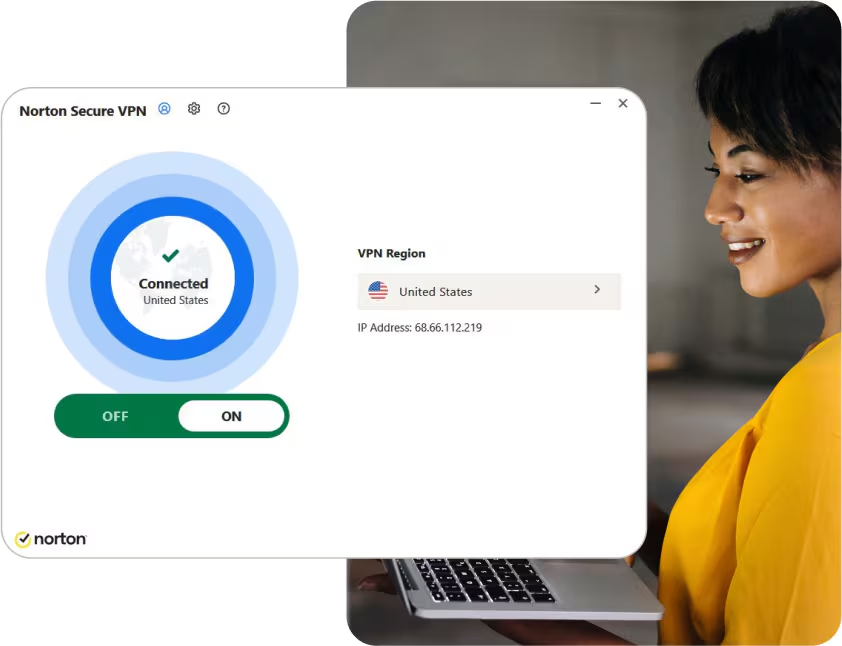
Norton VPN prides itself on its easy-to-use interface, which is designed to cater to both beginners and experienced users. The application is intuitively designed, allowing you to set up and connect to a VPN server with minimal effort.
The interface provides clear options and helpful tips that guide you through the entire process—from installation to connection. This user-centric design ensures that even those with limited technical knowledge can benefit from the high-level security offered by Norton VPN.
For users who prefer a more hands-on approach, the app allows you to choose specific server locations and customize settings to optimize your connection. This flexibility makes Norton VPN a versatile tool for a wide range of use cases.
🔒 5. DNS and IP Leak Protection
In addition to robust encryption, Norton VPN includes advanced features such as DNS leak protection and IP leak protection. Your IP address is a critical piece of information that can reveal your physical location; therefore, protecting it is essential for maintaining privacy.
DNS leak protection ensures that your DNS requests are routed securely through the VPN tunnel rather than leaking to your local network. Similarly, IP leak protection makes sure that even if your VPN connection drops momentarily, your true IP address is not exposed.
These features work together to ensure that your online identity remains concealed and your browsing history stays private, even in the event of technical disruptions.
🧳 6. Kill Switch Feature
Norton VPN includes a critical security feature known as the automatic kill switch. In the event that the VPN connection is interrupted, the kill switch immediately disconnects your internet connection. This prevents your data from being transmitted over an unprotected connection and ensures that your real IP address is never exposed.
The kill switch is particularly useful when using public networks, where connection drops can occur unexpectedly. This safeguard ensures that your privacy remains intact at all times, even if technical issues arise.
💬 Additional Insights and User Experience
Norton VPN is not only a robust security tool—it also offers an excellent user experience. Many users appreciate how quickly the app connects and the clear, straightforward interface that makes navigation a breeze. The software is lightweight, meaning it does not consume excessive system resources, which is a significant advantage for both older and modern systems.
In addition, Norton VPN’s integration with other Norton security products provides a comprehensive digital safety ecosystem. This synergy means that if you already use Norton antivirus or other security solutions, the VPN fits naturally into your existing setup, offering enhanced protection without adding complexity.
User feedback often highlights the reliability of the connection and the minimal impact on overall system performance. Whether for work or leisure, Norton VPN has consistently proven its ability to maintain fast, stable connections even under heavy usage conditions.
🔍 Final Thoughts: Why Choose Norton VPN for Windows?
In today’s digital age, online privacy and security are paramount. Norton VPN for Windows stands out as a secure, user-friendly, and efficient solution designed to protect your personal data and online activities. Its robust encryption, extensive server network, and additional security features make it a reliable tool for anyone who wants to safeguard their digital life.
Whether you are a casual user or a professional who requires consistent and uncompromised security, Norton VPN delivers a comprehensive suite of features that ensure your information remains confidential and your internet experience remains uninterrupted. The simplicity of its design makes it accessible for all, while its powerful security protocols ensure that even the most sensitive data remains protected.
Norton VPN’s emphasis on ease of use combined with high-level protection makes it an ideal choice for individuals looking for a trustworthy VPN solution without unnecessary complexity. Its global server access, automatic kill switch, and advanced leak protection features provide the peace of mind that is crucial in an era where cyber threats are increasingly sophisticated.
✅ Key Benefits:
- ✔ AES-256 encryption for top-notch security
- ✔ Servers in 30+ countries for global access
- ✔ Fast, unlimited bandwidth for streaming and browsing
- ✔ User-friendly interface with simple setup
- ✔ Automatic kill switch and Wi-Fi security to safeguard data
For users looking for reliable, straightforward security, Norton VPN is a trusted name that provides excellent protection with a focus on ease of use and privacy. Its commitment to maintaining your confidentiality while delivering high-speed, secure connectivity makes it a standout choice in the crowded VPN market.
Overall, Norton VPN for Windows is an excellent investment for anyone who values their online privacy. With robust encryption, a comprehensive set of security features, and an easy-to-navigate interface, it has proven itself as a dependable solution in today’s ever-evolving cybersecurity landscape.
 Norton VPN for Windows