💡 Key Features and Advantages
TunnelBear VPN might have a cute bear mascot, but don’t let the playful design fool you—this service is packed with impressive features that offer excellent security and privacy. TunnelBear’s focus on simplicity and ease of use makes it a great choice for VPN beginners, but it still has everything you need to maintain privacy and access global content.
🛡 1. Top-Level Encryption for Privacy and Security
TunnelBear uses AES-256 encryption to secure your online activities, ensuring that your internet traffic is encrypted with the same robust standards as those used by banks and governments. This encryption method guarantees that your sensitive information—whether it’s passwords, financial data, or personal messages—remains completely protected while you browse the web or use public Wi-Fi.
Thanks to this high level of encryption, you won’t have to worry about your data being intercepted by cybercriminals or other third parties. TunnelBear ensures that your online privacy is respected, offering a secure connection whenever you’re online.
🌍 2. Access Geo-Restricted Content with Ease
TunnelBear’s wide network of servers allows you to bypass geo-blocks and access websites, apps, and services that may be restricted in your region. With servers in over 20 countries, you can easily connect to any location and unlock content from all around the world. Whether you're trying to access Netflix, BBC iPlayer, or other region-locked services, TunnelBear allows you to appear as if you're browsing from another country.
For example, if you want to watch your home country’s streaming services while traveling abroad, simply connect to a server in your home country and enjoy unrestricted access to your favorite shows and movies. TunnelBear makes it easy to unblock content and navigate around the limitations of region-based censorship.
🚀 3. User-Friendly and Simple Setup
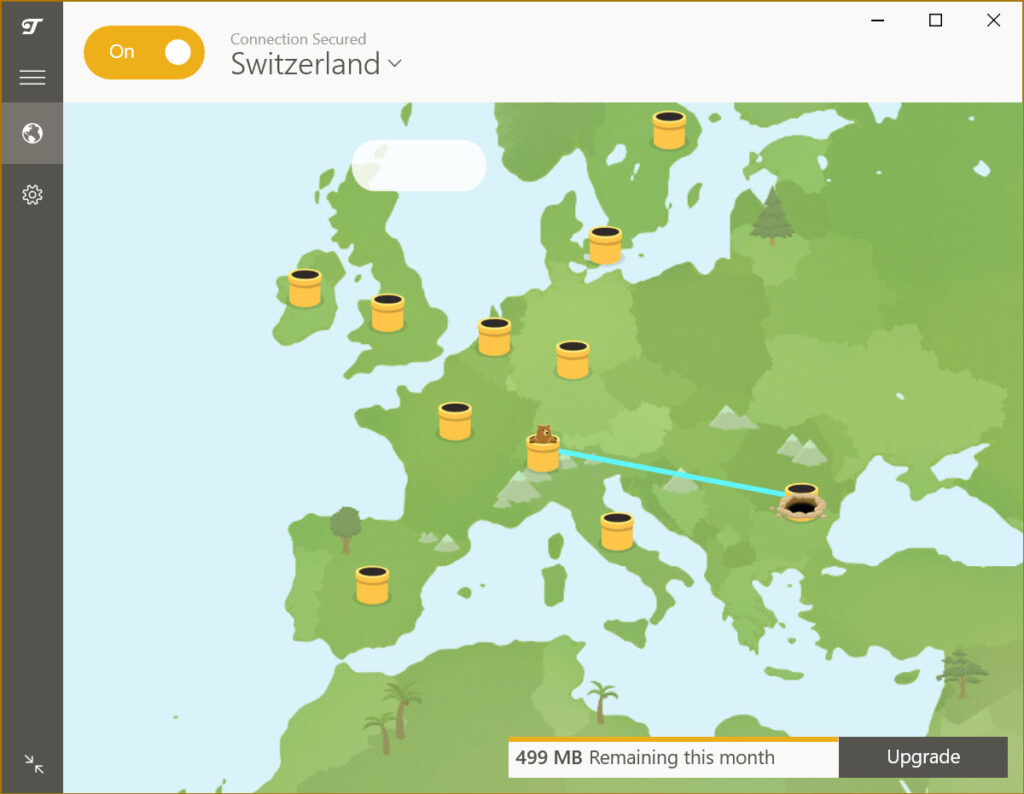
One of the main selling points of TunnelBear is its easy-to-use interface. Whether you're new to VPNs or have used them before, the setup process is straightforward and intuitive. The app’s friendly bear-themed design adds a fun touch while keeping things simple.
To get started, all you need to do is download and install the app, log in, and click a button to connect to the VPN. TunnelBear will automatically choose the fastest server based on your location, but if you prefer, you can also manually select a server from the list. The app is designed to require minimal effort from users, making it ideal for those who just want to secure their browsing without dealing with complicated settings or configurations.
🧑💻 4. No-Logs Policy for Complete Privacy
TunnelBear has a strict no-logs policy, meaning that it does not keep track of any user data or activity. This is crucial for users who are concerned about their privacy. When you connect to TunnelBear, you can rest assured that your browsing history, IP address, and other personal information are not being recorded or stored.
The company also undergoes regular third-party audits to ensure that their privacy practices are transparent and reliable. This independent verification adds an extra layer of trust, making TunnelBear a solid choice for privacy-conscious individuals.
🧳 5. Free Plan and Generous Paid Options
TunnelBear offers a free plan that gives you 500 MB of data each month. While this isn’t enough for heavy streaming or large downloads, it’s great for light browsing or occasional use. If you need more data, TunnelBear also offers affordable paid plans with unlimited bandwidth, making it a great choice for users who want to enjoy secure, unrestricted internet access without breaking the bank.
The paid plans offer features such as unlimited data, access to all server locations, and priority customer support. Plus, TunnelBear has a user-friendly payment process and offers a money-back guarantee, so you can try the service risk-free for a month before making a long-term commitment.
🦸♂️ 6. GhostBear Feature for Bypassing Censorship
In countries where internet censorship is prevalent, TunnelBear offers a special feature called GhostBear. This tool obfuscates your VPN traffic, making it harder for authorities and firewalls to detect and block VPN usage. GhostBear helps you maintain a secure connection even in regions with heavy internet restrictions, such as China or the UAE.
By using this feature, you can bypass government censorship and access websites and services that might otherwise be restricted in certain countries. This is a key advantage for travelers, journalists, and anyone who needs to maintain access to the open internet in regions with strict censorship policies.
🔍 Final Thoughts: Why Choose TunnelBear for Windows?
TunnelBear VPN for Windows is a fantastic option for anyone looking for an easy-to-use, secure, and reliable VPN service. Whether you’re concerned about privacy while browsing, need to bypass geo-restrictions, or simply want a simple way to protect your data, TunnelBear offers great performance and user experience.
✅ Key Benefits:
- ✔ AES-256 encryption for secure browsing and data protection
- ✔ Servers in over 20 countries for global access
- ✔ Strict no-logs policy for complete privacy
- ✔ GhostBear feature for bypassing censorship
- ✔ Free plan with 500 MB of data and affordable paid options
TunnelBear is ideal for anyone new to VPNs or looking for a simple solution without a lot of technical complexity. The service’s straightforward design, strong security features, and affordable pricing make it a great choice for casual users who want to stay safe online.
 TunnelBear VPN for Windows